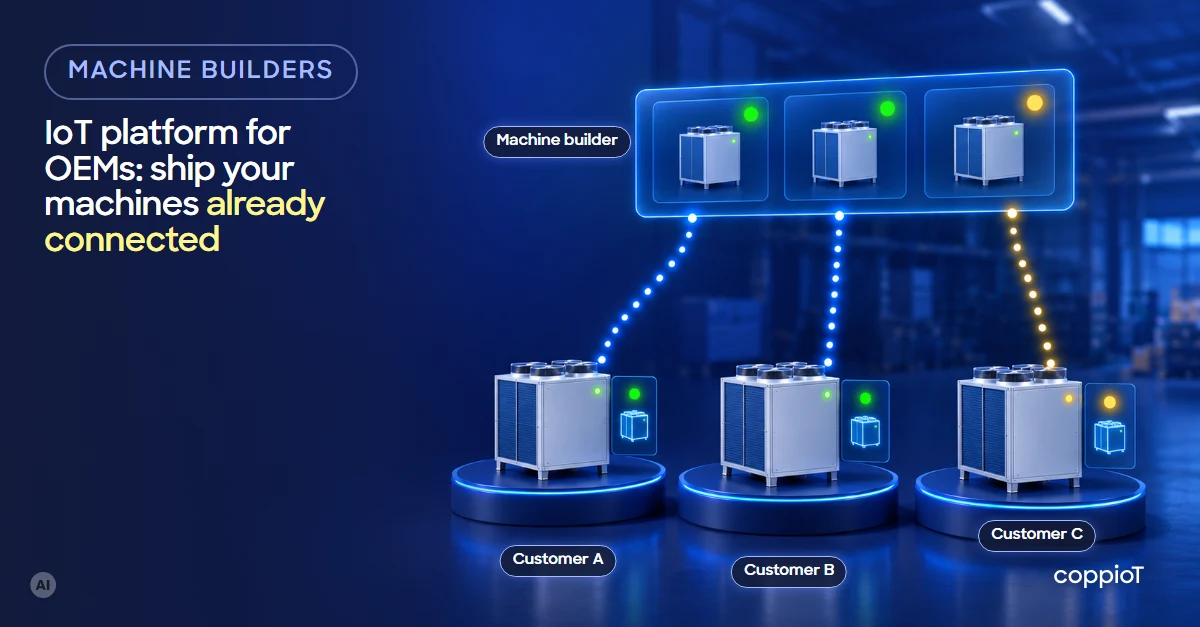
An IoT platform for OEMs¹ lets every machine you sell leave the factory ready to send its data: hours, cycles, temperatures, consumption and alarms. You see your whole fleet from anywhere, each customer sees only their own machines, and with that data you can offer them a new service. The machine doesn’t need a redesign: it reads the values its PLC² already has.
What does shipping a machine already connected mean?
The machine reaches the customer with a small device, the gateway, which reads the data from its PLC and sends it securely to the cloud. From day one:
- You see how it works, even hundreds of kilometres away: running hours, cycles, temperatures, consumption and alarms.
- Your customer sees their machine with its data in view, without asking you for anything.
- Everything is stored, with its date and time, so you know what happened before a stop.
It isn’t the same as remote access. With remote access you log in once the customer has called because the machine has stopped. With a connected machine you see its data all the time, including the days it runs fine.
Why should a machine builder connect its machines?
Because today, once the machine leaves your door, you stop hearing about it until there’s a problem. Connecting it changes three things:
| Today | With the machine connected |
|---|---|
| You learn about a breakdown when the customer calls | You see the alarm and what happened before it |
| Your technician travels to see what’s wrong | It’s often solved over the phone |
| You don’t know how many hours each machine works | You know the real use of your whole fleet |
| The relationship ends with the sale and the warranty | You offer a service built on their machine’s data |
And there’s a fourth: a connected machine is one more reason to buy it. Your customer receives it with its data in view from day one.
What data can you get from the machine?
What your machine already measures, turned into something useful:
- Hours and cycles: how much each machine works and when its maintenance is due.
- Consumption: electricity, air or water, per machine and per part.
- Temperatures and vibration: they help you see wear coming before the breakdown.
- Alarms and stops: what happened before you pick up the phone.
If you want to measure something you don’t measure today, such as a motor’s vibration, at most a small adjustment is needed: adding a sensor. The machine isn’t redesigned.
Do you have to change the PLC program?
Usually not. At most, the PLC’s communication is enabled or configured. Most modern PLCs support both OPC UA³ and Modbus; when they have both, we recommend OPC UA. On older machines OPC UA is rarely available: the data is read over Modbus or by wiring physical signals to the gateway’s analog inputs and pulse counters.
How is it set up for series-built or custom machines?
- Series-built: you prepare the machine with its values once and it works for the whole range. Every unit you sell is registered the same way, and you can compare identical machines at different customers.
- Custom-built: each machine is its own project. You choose which values to read on each one, without programming.
Either way, the steps are the same:
- Choose the data that’s useful to you and your customer: what explains breakdowns, use and consumption.
- Prepare the machine: the gateway in the cabinet and the PLC’s communication enabled.
- Register the machine with its values. What you prepare once is repeated on every unit.
- Ship it connected and create that customer’s project, so they see only their machine.
- Start using the data: alerts, reports and the service you want to offer.
How do you see your whole fleet, and what does each customer see?
You have a single coppioT with one project per customer. From there you see and manage the machines of all your projects, wherever you are. Each customer logs into theirs and sees only their machines.
Security is one of the concerns of any customer receiving a connected machine. How each step is protected, from the PLC to the cloud, is explained in industrial IoT security.
What if your customer doesn’t want the machine going out through their network? A separate SIM connection (4G or 5G) is used, agreed with their IT team.
What service can you offer with the data?
Grow your revenue with a new service: offer IoT to your customers as a service, with their machine’s data.
- Machine monitoring, with its charts and reports.
- Alerts when something goes out of the normal range: a rising temperature, a recurring alarm.
- Maintenance by real use, by hours and cycles, not by calendar.
- With months of history, the next step: predictive maintenance, which warns you before the machine stops. We cover it in predictive maintenance with IoT.
How we do it with coppioT
coppioT is engapplic’s no-code industrial IoT platform: it connects your machines to the cloud on AWS, in the region you choose, with no programming needed. Today it reads OPC UA, Modbus RTU and TCP, analog inputs and pulse counters, and if your machine speaks another protocol, tell us and we’ll make it compatible.
- coppioT generates the gateway’s installation files. With our gateway, it installs itself as soon as it has internet access.
- You register the machine with its register map, or you give its PDF manual to an AI assistant such as Claude and it registers it for you.
- Your charts and reports, in the tools you already know: Grafana or Power BI.
If you want to compare coppioT with building it by hand or with a low-code platform, see low-code or no-code IoT platform for industry. And everything coppioT does for machine builders is in IoT for machine builders.
We start with a short, fixed-price consultancy with engapplic: we look at what you want to achieve and what your machine has. Then a pilot on one or two machines, and scaling to the rest of the fleet. It’s how we work on the paint booth we have connected at a RACC-AXA workshop in Barcelona, with the integrator Sinnek.
All of it in days, not months: up to 90% faster than building it by hand.
Frequently asked questions
Does the machine need a redesign to connect it?
No. It reads the values the PLC already has; at most, its communication is enabled or configured. If you want to measure something new, such as vibration, a sensor is added.
What happens if the internet goes down at the customer’s plant?
The gateway stores the data in its memory and sends it when the connection comes back. How long it can hold depends on its memory, how often the data is read and how many variables are read; as a reference, 1 or 2 days, approximately.
Can my customer see other machines’ data?
No. Each customer has their own project and sees only their machines. You see everyone’s.
Does it work if I build custom machines?
Yes. Each machine is its own project and you choose which values to read on each one. If you build in series, you prepare it once and it works for the whole range.
How is it paid for?
By subscription. The consultancy and the pilot are fixed-price; when scaling, the cost of coppioT per machine is known roughly in advance.
Want your machines to leave the factory already connected? Ask for a demo: fill in the form, tell us which machines you build and we’ll show you how to see your whole fleet.
Acronyms
¹ OEM (Original Equipment Manufacturer): here, the machine builder that sells its machines to other companies.
² PLC (Programmable Logic Controller): the controller that runs the machine; for example, a Siemens S7 or a Beckhoff.
³ OPC UA (Open Platform Communications Unified Architecture): an industrial communication standard for reading data from a PLC or other device securely, with its name and type.


